 Data Compression
Curriculum Focus: Investigate simple data compression techniques (VC2TDI10D01).
 Teach (I Do)
What is Data Compression?
In the digital world, everything is just a long list of numbers (1s and 0s). - A 4K movie is billions of numbers. - A high-quality game texture is millions of numbers.
Compression is the process of using mathematics to reduce that number count without (hopefully) destroying the content.
Why do we need it?
- Storage: Without compression, a 10-minute 4K video could take up 100GB. Your hard drive would fill up instantly.
- Speed: The internet is a pipe. Sending a smaller file through the pipe is faster. This is why Netflix streams work (compressed video) but uncompressed video would buffer forever.
- Game Performance: In games, smaller files load faster, meaning shorter loading screens for players.
The Two Types of Compression
We classify compression into two main categories based on whether we keep the original data perfectly or sacrifice some of it for size.
| Type | Analogy | Technical Explanation | Common Formats |
|---|---|---|---|
| Lossless | Folding your clothes. You pack them tight to fit the suitcase. When you unpack, the clothes are 100% identical to how they started. Nothing is lost. | Looks for patterns (like "AAAAA") and shortens them. If the data has no patterns (like random noise), it can't compress well. | .zip, .png, .flac (Audio), .gif |
| Lossy | Chopping vegetables. You peel the skin and chop off the ends to fit them in the pot. You fit more in, but you can never put the carrot back together again. | Analyzes the data and throws away parts human eyes/ears are bad at noticing. It literally deletes information to save massive amounts of space. | .jpg (Images), .mp3 (Audio), .mp4 (Video) |
A Gamer's Analogy: Minecraft Stacking
Think of Minecraft. You have dug up 64 blocks of Dirt.
* Uncompressed: Every single dirt block takes up its own inventory slot. You would need 64 slots just to carry some dirt. (Inefficient!)
* Compressed: The game "Stacks" them. It takes those 64 separate items and squashes them into 1 slot, with a number 64.
This is exactly what computers do. Instead of saving Dirt, Dirt, Dirt..., they save 64 Dirt.
 Model & Guide (We Do)
Activity: The Pixel Challenge
The Setup: The teacher draws a simple 8x8 grid on the whiteboard (or displays a pixel art image). * Row 1: 8 White squares. * Row 2: 2 White, 4 Black, 2 White. * Row 3: 2 White, 4 Black, 2 White.
Round 1: Uncompressed (The Hard Way) * Task: Students must write down the colour of every single square in order, left to right. * Example: "White, White, White, White, White..." * Result: Their hands will hurt. It takes ages. This is Raw Data.
Round 2: Compressed (The Smart Way) * Task: Now, use the "Stacking" method (Run-Length Encoding). Count the colours and write the number. * Example: "8 White", "2 White, 4 Black, 2 White". * Result: It takes seconds. You have just performed Lossless Compression.
Part 2: The "Lossy" Experiment
1. The Concept (Abstract)
Look at this smooth gradient. Every bar is a slightly different number.

If we force the computer to "group" them to save space, we get this:

Notice the "Banding" (the visible vertical lines) above. To save space, the computer "grouped" similar colours. We saved space, but lost the smoothness.
2. The Reality (Real Photo)
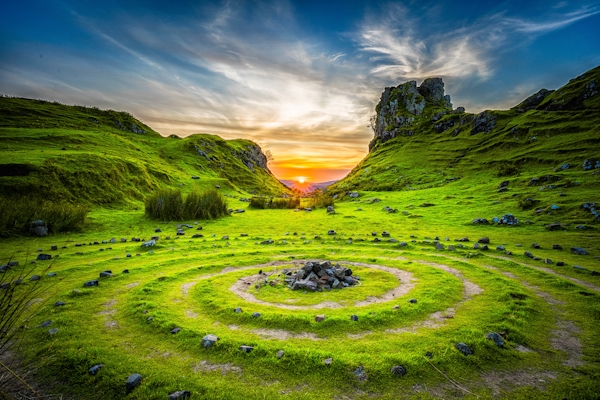
Now, let's see how that looks on a real photo of a sunset.
High Quality (Lossless-ish):
Low Quality (Heavy Compression):
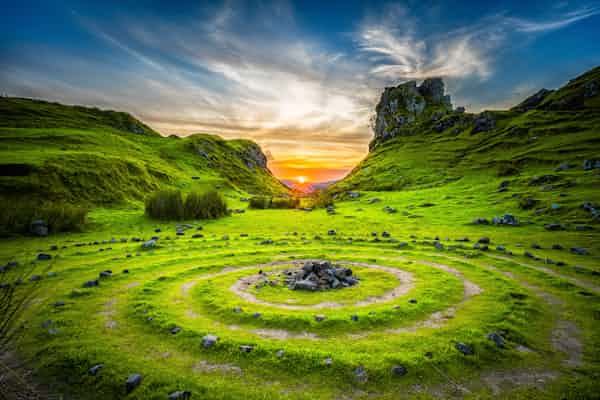
Notice the "Blocks" in the sky. The computer tried to group similar blue pixels together, ruining the image.
 Apply and Extend (You Do)
Practical Task: Optimizing Flappy Bird
Step 1: The "Heavy" Asset
- Download this High-Res City Background (Right Click > Save Link As...).
- Import it into your Unity project's
Spritesfolder. - Click on it.
- Look at the Inspector Preview (bottom of the window).
- Write down the size (e.g., 6.7 MB).

Step 2: Experiment A (Resolution)
- In the Inspector, check the "Override for PC/Mac/Linux" box.
- Change Max Size from 2048 to 512.
- Hit Apply.
- What is the new size?
Step 3: Experiment B (Format)
- Change Max Size back to 2048.
- Change Format to
RGB Compressed DXT1(orBC7). - Hit Apply.
- Did the size change? Did the quality change?
Step 4: Comparison
Check Your Understanding
- Which setting saved the most space: changing the Size or the Format?
- Zoom in closely. Can you see the "blocks" (artifacts) now?
- Why would a mobile game need to use these settings?
 Review
- Lossless: Perfect quality, larger file size (PNG, ZIP).
- Lossy: Lower quality, tiny file size (JPEG, MP3).
- RLE: Grouping patterns together (3B, 2W).